Enshrouded Dedicated Server Guide - Setup, Ports, RAM & Hosting
How to set up an Enshrouded dedicated server: SteamCMD install, enshrouded_server.json settings, UDP ports, RAM requirements, saves, and G-Portal hosting options.
Last Updated: October 30, 2026 (Enshrouded 1.0, Hotfix 1.0.0.3)
Keen Games ships a free, official dedicated server tool with the game, and one world can host up to 16 players. This guide covers the SteamCMD install, the enshrouded_server.json settings that matter, port forwarding, real-world RAM requirements, save behavior after 1.0, and when renting from a host beats self-hosting.
What Is the Enshrouded Dedicated Server (and Who Can Host One)?
It is a free, official tool — App ID 2278520 — listed under Steam → Library → Tools once you own the base game, and it runs a persistent world for 1-16 players without keeping a game client open.
Hosting is a PC affair. Official tooling targets Windows; the community does run it through Proton/Wine on Linux, but official Linux support is reportedly still “planned for later.” PS5 players reportedly cannot host their own dedicated server either — console players join worlds that a PC is running, so a console-only group needs at least one PC-based host or a rented server.
How Do You Install the Enshrouded Dedicated Server with SteamCMD?
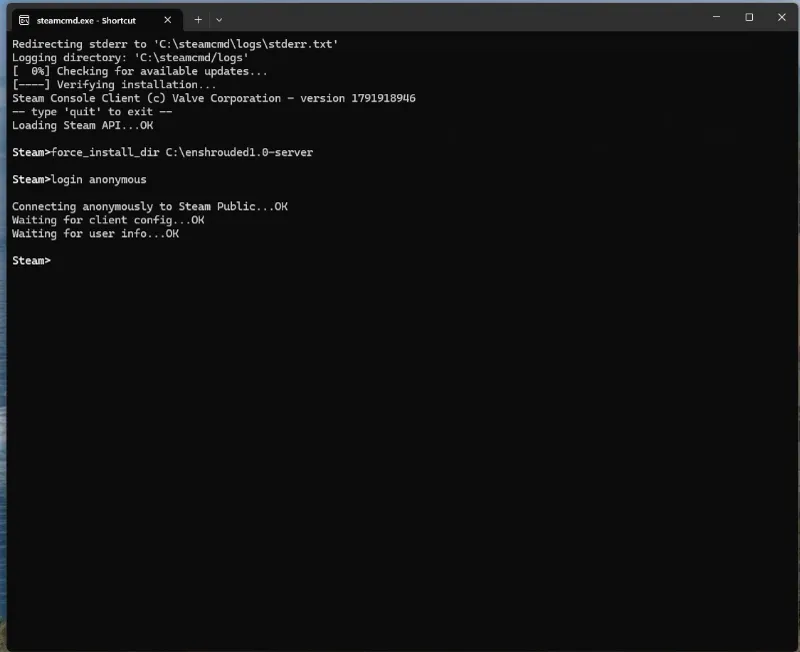
There are two ways to get the files: the one-click route (Steam → Library → Tools → Enshrouded Dedicated Server) or the headless SteamCMD route most server operators use. Both install the same files; SteamCMD is simply what you will re-run after every game update.
steamcmd +login anonymous +force_install_dir C:\enshrouded-server +app_update 2278520 validate +quitExpect about 30 GB of disk for the install, roughly 13 GB of it after unpacking, per the official server FAQ. One habit to lock in early: game updates do not auto-apply to the server. When Enshrouded patches, re-run the command above to pull the new build before players report version mismatches. Keen’s own server documentation lives in the official Dedicated Server FAQ.
Which enshrouded_server.json Settings Matter?
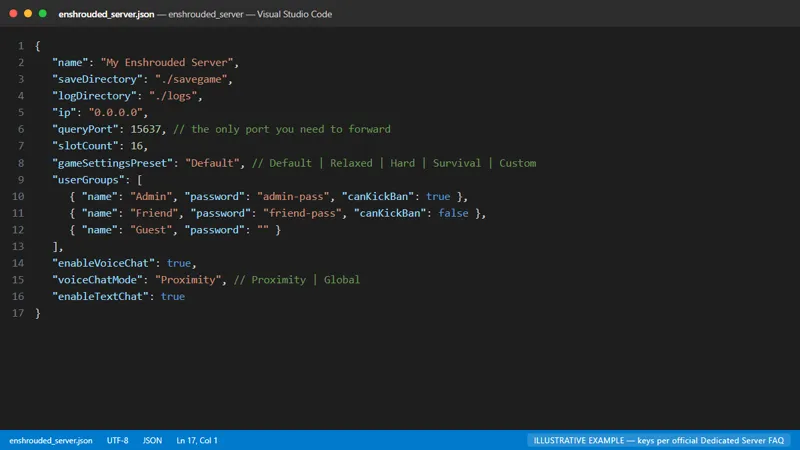
Core settings live in enshrouded_server.json, in the same directory as the server executable — edit it with any text editor and restart the server to apply changes.
| Key | What it controls | Example value |
|---|---|---|
| name | Name shown in the server browser | “Embervale Builders” |
| saveDirectory | Where world saves are written | ./savegame |
| logDirectory | Where server logs are written | ./logs |
| ip | Network interface to bind | 0.0.0.0 |
| queryPort | Steam query port (UDP) | 15637 |
| slotCount | Player slots (1-16) | 16 |
| gameSettingsPreset | Difficulty preset: Default, Relaxed, Hard, Survival, or Custom | Default |
| userGroups | Permission groups (Admin, Friend, Guest) with passwords, canKickBan, and reservedSlots | See the official sample file |
| enableVoiceChat | Turns voice chat on or off | true |
| voiceChatMode | Proximity or Global voice chat | Proximity |
| enableTextChat | Turns text chat on or off | true |
userGroups is the block worth reading carefully: it defines who can join, who holds admin powers such as kick and ban, how many reserved slots regulars get, and whether the world is password-protected. If you want a friends-only server, this is where that happens.
Which Ports Does an Enshrouded Server Need?
Just one: UDP 15637. The official FAQ documents queryPort 15637, and as of the 1.0 build there is no separate game port anymore — the enshrouded.tools server database (based on build 25988036) confirms that only the query port needs to be open.
- UDP 15637 — the only port you need to forward; it serves matchmaking and query traffic alike.
- Port 27015 — used by Steam’s server browser listing; watch for conflicts if the same machine also runs Ark or Palworld servers.
Following an older Early Access tutorial? It may tell you to forward a second port (UDP 15636) for game traffic. That requirement is gone in 1.0 — one rule for UDP 15637 is enough.
On Windows, the built-in firewall needs an inbound rule before anyone can connect. A community-standard PowerShell one-liner for that looks like this:
New-NetFirewallRule -DisplayName "Enshrouded Server (Query)" -Direction Inbound -Protocol UDP -LocalPort 15637 -Action AllowTreat that snippet as a community pattern rather than official documentation — adjust the display name and scope to fit your own security setup.
How Much RAM Does an Enshrouded Dedicated Server Need?
Official minimums are surprisingly modest: the server FAQ lists roughly 4.4 GB of free RAM plus about 100 MB per connected player. Keen’s own hosting spec sheet, however, calls for 16 GB of RAM on a full 16-player world.
| Source | RAM guidance | Other specs |
|---|---|---|
| Official server FAQ | ~4.4 GB free RAM + ~100 MB per player; ideally keep total physical memory use ≤6 GB | ~30 GB disk (~13 GB after unpacking) |
| Keen hosting spec sheet (third-party transcription) | 16 GB RAM for up to 16 players | i7 3.7 GHz, 8 cores/16 threads; smaller groups: i7 3.2 GHz, 6 cores/12 threads, 30 GB SSD, ~2 Mbit/s upload per player |
The two documents disagree because they describe different goals: the FAQ is a “will boot and run” figure, the spec sheet a “feels good with a full server” figure. Practical advice: 6 GB is the realistic floor for small groups, and if you genuinely plan to fill all 16 slots, budget 16 GB.
Where Are Saves and Character Data Stored?
World data lives on the server, but each character’s progression is stored locally on the player’s own client — that is the official FAQ position, and it is the opposite of what some host marketing pages claim.
In practice, a character carries equipment, backpack contents, level, skills, explored-map memory, personal recipes, harvested Shroud Roots, and collected lore from server to server. Most recipes unlocked through NPCs stay behind with the world where they were earned. Because characters are client-side, backing up your own save folder matters even when the server is fine. Some hosting providers advertise fully server-side progression; Keen’s FAQ says otherwise, so treat the official documentation as authoritative.
As for the world itself: the server autosaves every 5 minutes, a single world file runs 1-100 MB, and 1.0 wiped nothing — old saves convert to the new format automatically on first load, with the original file kept as a backup. More on what else changed in our 1.0 update overview.
Should You Self-Host or Rent? (G-Portal and Alternatives)
G-Portal is Keen Games’ official hosting partner, and it is the lowest-effort way to run a persistent 16-slot world; self-hosting costs nothing but puts updates, uptime, and port forwarding on you.
| Option | Cost (October 2026 snapshot) | You handle | File access | Best for |
|---|---|---|---|---|
| Your own gaming PC | Free | Keeping the PC on, ports, updates | Full | Weekend worlds with 2-3 friends |
| Home server / spare PC | Hardware + power | OS, SteamCMD updates, uptime | Full | Long-running private worlds |
| G-Portal (official Keen partner) | Reportedly $18.45 for 10 slots / $20.95 for 16 slots per 30 days | Nothing — web panel, 4-16 slots, 50 GB backup space included | Limited | Hands-off hosting that “just works” |
| Other hosts (WinterNode, Host Havoc, Supercraft, Flux) | WinterNode reportedly from $1.99/GB | Nothing | Varies | Price shopping |
Hosting prices move constantly, so treat those numbers as October 2026 listings and re-check before committing. Whichever route you pick, the server files and configuration are the same — a host simply automates the SteamCMD-and-firewall work covered above.
How Do Players Join an Enshrouded Dedicated Server?
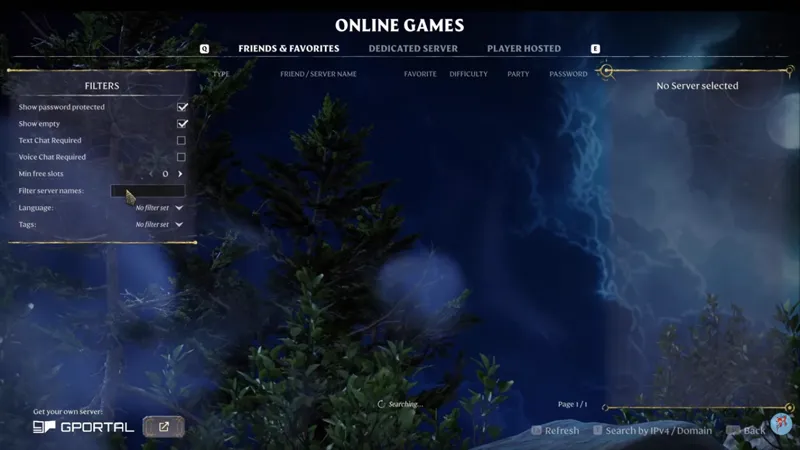
The server is ready when your log prints [Session] 'HostOnline' (up)! — from there, players join through the in-game browser or a Steam favorites entry.
In-game, choose Join and filter for dedicated servers; the browser supports tags such as LookingForPlayers, BaseBuilding, Exploration, Roleplay, and language tags, so setting yours in the config makes the server findable for strangers. Via Steam, open View → Game Servers and add your server’s IP with the query port (15637 by default) to favorites, which pins it for the whole group without typing IPs again.
Dragging friends into the game for the first time? Our Enshrouded beginner’s guide covers the first hours, and the map guide explains how the shared world is laid out.
Enshrouded Dedicated Server FAQ
Is the Enshrouded dedicated server free?
Yes. The official tool is free and ships in Steam’s Tools section; you only need to own the base game. Costs appear only when you buy hardware or rent a host.
Can PS5 players host a dedicated server?
Reportedly not — hosting is a PC-side job, and PS5 players join servers running on PC. Official confirmation of the restriction is still pending.
Did the 1.0 update wipe old servers?
No. Old saves convert to the new format automatically on first load, with the original file preserved as a backup.
Do characters transfer between servers?
Yes. Character progression is client-side per the official FAQ — gear, backpack, level, skills, map memory, personal recipes, and more travel with the player, while the world stays on the server.
Does the dedicated server run on Linux?
Not officially yet. The community runs it via Proton/Wine, and official Linux support is reportedly planned for a later date.
Related Pages
Related Articles
guides
Enshrouded 1.0 Update: What's New in the Full Release
All the new content in Enshrouded 1.0: Cinder's Cradle, the story finale, Flame Level 11, nine new spells, the Sparkworks system, and changes for returning players.
guides
Enshrouded Beginner Guide: How to Start (1.0 First Hours)
A practical Enshrouded beginner guide for 1.0: the best first-hour order, base placement, Shroud survival rules, difficulty settings, and early mistakes to avoid.
guides
Enshrouded Map Guide - World Size, Regions, Fast Travel & Interactive Maps
Complete Enshrouded map guide: world size, every region with level ranges, Flame Altar fast travel rules, Ancient Spires, and the best interactive map tools.
Was this helpful?
Thanks for the feedback!